
Zebra DNA Cloud: Streamlined Management for Zebra Barcode Equipment
Posted by The ZPS Store on Mar 31st 2025
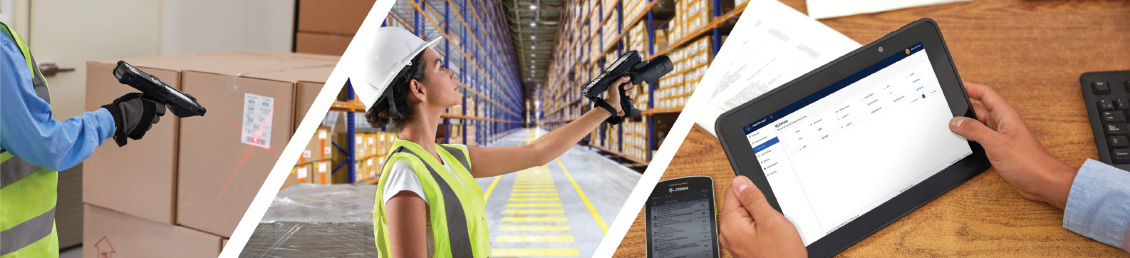
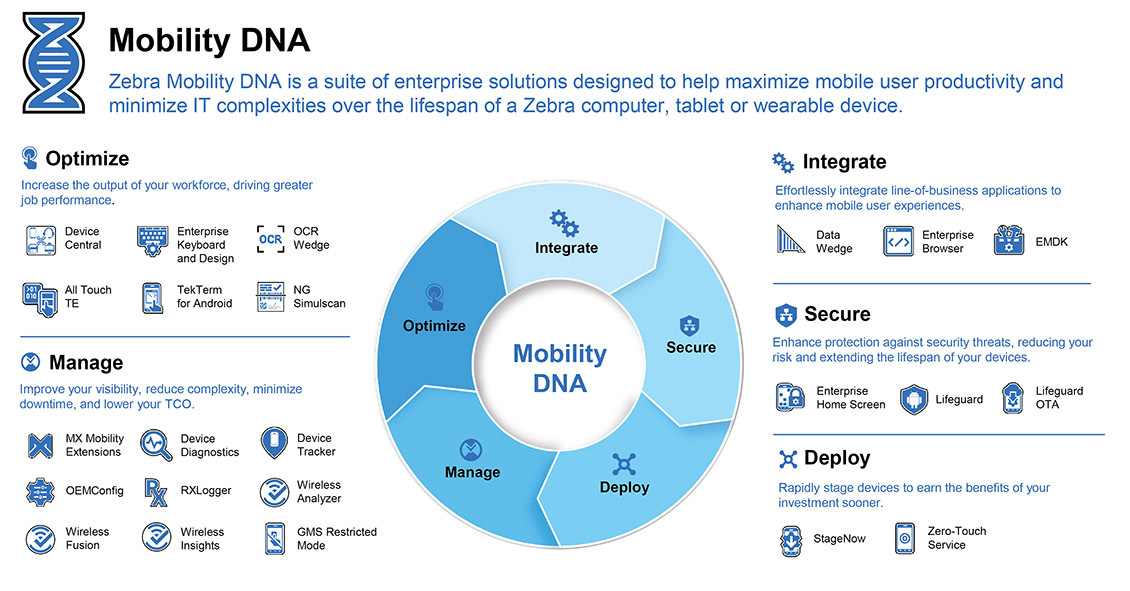
Zebra Technologies offers a comprehensive suite of mobile computing solutions, including market-leading mobile PCs, tablets, and handheld devices. Complementing this barcode hardware ecosystem is a range of software tools designed to enhance mobile user productivity and simplify IT management. At the forefront of these software offerings is Zebra DNA Cloud, an administrative solution engineered for the efficient management and configuration of Zebra devices and their associated applications . By consolidating the functionalities of Zebra's Mobility DNA portfolio into a single, intuitively organized interface, Zebra DNA Cloud provides a unified user experience, enabling organizations to remotely deploy, manage, and support their Zebra devices throughout their entire lifecycle . This platform empowers administrators to tailor device settings to specific operational needs, ensuring users have access to the necessary Zebra applications to perform their tasks effectively . Furthermore, Zebra DNA Cloud facilitates the seamless updating of device software and security features through its LifeGuard Over-The-Air (OTA) capability, all achievable with a single click and without the need for physical device interaction . Ultimately, Zebra DNA Cloud aims to reduce the total cost of ownership and streamline the maintenance of Zebra mobile devices .
Key Features and Functionality of Zebra DNA Cloud
Zebra DNA Cloud integrates several key features and functionalities designed to simplify the management of Zebra devices. These include Mobility Extensions (Mx), Application Management & Configuration, Zebra Lifeguard, and Basic Device Data.
Extending Android Capabilities: Mobility Extensions (Mx)
At the core of Zebra DNA Cloud's device management capabilities lies its utilization of Zebra's Mobility Extensions (Mx) . Mx is a suite of features embedded within Zebra devices that expands upon the standard Android operating system, providing enhanced security, device management, and enterprise-grade functionalities . Zebra DNA Cloud leverages Mx to execute many of the administrative actions performed through its cloud-based interface . This means that administrators can control sophisticated device-level settings and features through a user-friendly console without needing to engage with complex configurations on individual devices . Whether an organization operates without a third-party Enterprise Mobility Management (EMM) system or alongside one, Zebra DNA Cloud can utilize Mx to manage devices effectively . For instance, configuring Wi-Fi parameters, including RF band selection and MAC address randomization, is supported on devices running Mx 11.4 and later . The platform's Zero Touch Wizard streamlines the initial setup of new or reset devices for network access, likely employing Mx for efficient network configuration . Even the process of enrolling devices into Zebra DNA Cloud or third-party EMMs through barcode scanning likely utilizes Mx to provision the devices . The Device Diagnostics Tool, accessible within Zebra DNA Cloud, likely interacts with devices via Mx to gather essential diagnostic information . In essence, Mx provides the foundational layer that enables Zebra DNA Cloud to remotely manage, configure, secure, and support Zebra devices through a centralized cloud platform .
Efficient App Management and Configuration
Zebra DNA Cloud provides a robust administrative solution for managing and configuring both Zebra and third-party applications on enrolled devices . The platform features a regularly updated Zebra Collection of apps that can be easily managed . Recognizing the need for flexibility, Zebra DNA Cloud supports the management of multiple versions of the same application within the App Collection . For application deployment, administrators have the option to utilize Zebra Storage or connect their existing Google Drive accounts, offering versatile distribution methods . To enhance efficiency, Zebra DNA Cloud allows for bulk actions, such as reapplying or removing applications across multiple devices simultaneously . Furthermore, the platform enables the creation of managed configurations for applications like Enterprise Keyboard, offering granular control over app settings . The Device Settings Wizard within Zebra DNA Cloud allows for the configuration of various device parameters, including date and time settings with customizable time zones and locales . For more advanced configuration needs, the Advanced Device Settings Wizard provides granular control and can even alert administrators about outdated device components before applying configuration profiles . The ability to import and export device settings profiles further streamlines the configuration process, allowing administrators to save and reuse configurations as needed . Support for various versions of OEMConfig within Zebra DNA Cloud extends its configuration capabilities, enabling the management of specific device features and settings . Even network settings like Wi-Fi, APN, and roaming can be configured through the platform . These comprehensive application management and configuration features ensure that Zebra devices are equipped with the necessary software and settings to optimize productivity and meet specific organizational requirements.
Ensuring Security and Up-to-Date Performance: Zebra Lifeguard
A critical aspect of managing enterprise mobile devices is ensuring their ongoing security and optimal performance. Zebra Lifeguard plays a vital role in this by providing continuous security updates and extending the lifecycle of Zebra's Android-based enterprise devices . Going beyond standard Android updates, Lifeguard delivers timely patches for identified vulnerabilities, ensuring long-term security support crucial for devices with extended deployment lifespans. Within Zebra DNA Cloud, the LifeGuard OTA (Over-The-Air) functionality enables administrators to remotely and efficiently schedule and deploy operating system and security updates to their entire fleet of Zebra devices . This capability minimizes device downtime and ensures a consistent security posture across all deployed units . The process is designed for simplicity, often requiring just a single click to initiate updates without the need to physically interact with each device . To ensure compatibility and optimal performance, Zebra provides specific guidelines and tables outlining the minimum required LifeGuard software updates for different Android versions and Zebra device models . This detailed support for specific hardware underscores Zebra's commitment to providing a comprehensive and reliable device management solution.
Gaining Visibility: Basic Device Data
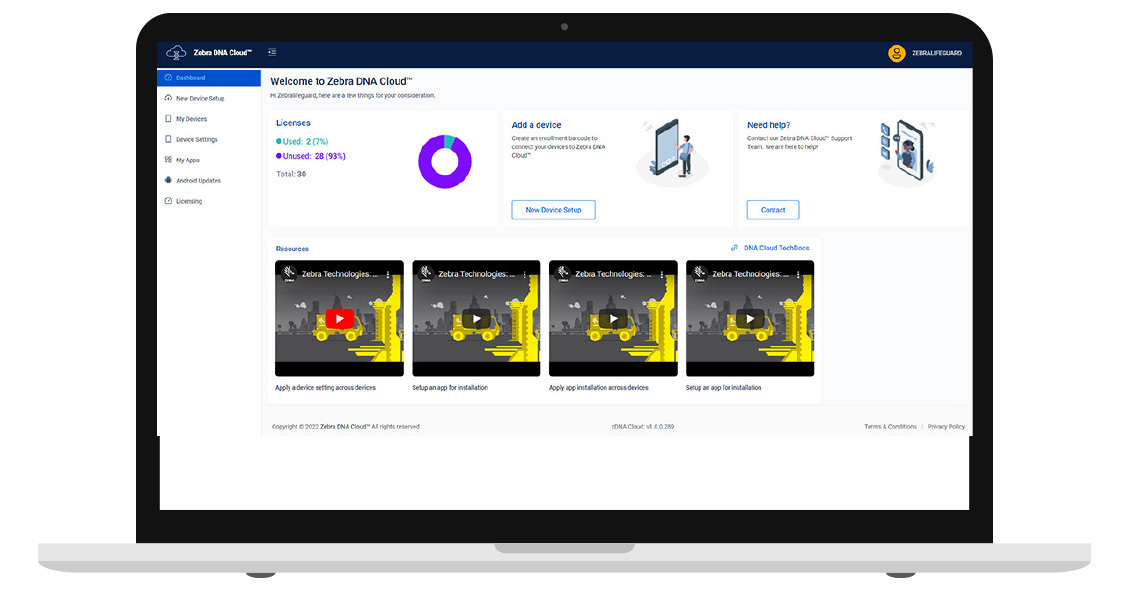
Zebra DNA Cloud provides a centralized dashboard offering a comprehensive, real-time overview of the entire fleet of managed Zebra devices . This intuitive console displays essential device information, including the current status of each device (e.g., active or inactive), battery health and charge levels, the installed Android operating system version, and device serial numbers . Furthermore, the dashboard provides insights into license allocation, ensuring administrators have a clear understanding of their software asset utilization . This critical data is typically refreshed on a regular basis, providing administrators with up-to-date visibility into their device fleet . Such comprehensive visibility empowers IT administrators to proactively identify potential issues, monitor device health trends, and make well-informed decisions concerning device management, maintenance schedules, and overall operational efficiency .
Understanding Mobile Device Management (MDM) Software
Mobile Device Management (MDM) software serves as a cornerstone for organizations seeking to effectively manage, secure, and monitor the mobile devices deployed within their operational environment . These solutions provide a centralized platform for overseeing a diverse range of devices, including smartphones and tablets, and sometimes extending to laptops . The primary purpose of MDM software is to enforce security protocols, manage the lifecycle of applications, and ensure that all managed devices adhere to established compliance standards .
Companies adopt MDM solutions for several compelling reasons. Firstly, they significantly enhance security by enabling organizations to implement and enforce robust security policies . These policies can include requirements for strong passwords, device encryption, the ability to remotely lock or wipe compromised devices, and restrictions on unauthorized access to sensitive corporate data . Secondly, MDM software offers centralized management capabilities, providing a single point of control for all enrolled mobile devices . This centralized approach streamlines tasks such as remotely configuring device settings, deploying and updating applications, and troubleshooting technical issues, leading to a notable reduction in IT overhead and improved efficiency . Thirdly, MDM solutions play a crucial role in improving compliance with both industry-specific regulations and internal organizational policies . By enforcing policies related to data security, access control, and device usage, MDM software helps organizations meet necessary compliance obligations . Finally, by facilitating secure access to essential corporate resources like email, applications, and documents on mobile devices, MDM solutions can contribute to increased employee productivity, empowering them to work effectively regardless of their physical location .
Zebra DNA Cloud: The Optimal MDM Choice for Zebra Barcode Equipment Users
While numerous MDM solutions are available in the market, Zebra DNA Cloud stands out as the premier choice for organizations utilizing Zebra barcode equipment, primarily due to its cost-effectiveness, simplified design and enhanced ease of use, and its specific optimization for Zebra hardware.
Cost-Effectiveness: A More Affordable Solution
Zebra DNA Cloud offers a compellingly priced solution for managing Zebra devices. It operates on a subscription-based model with various subscription durations available to suit different organizational needs, including 1-year, 3-year, and 5-year options . The starting price for a 1-year subscription can be as low as $28.00 or $29.95, often including standard service and technical support . When considering the monthly cost, a 1-year subscription at $29.95 translates to an estimated $2.50 per device per month, and a 5-year subscription at $109.14 equates to roughly $1.82 per device per month . This pricing structure positions Zebra DNA Cloud as a highly competitive option when compared to other popular MDM solutions. For instance, Scalefusion's pricing ranges from $2 to $6 per device per month , Microsoft Intune's plans are between $4 and $10 per user per month , SOTI MobiControl's cloud offering is priced at $4.00 per device per month (with an on-premises option at $3.25) , VMware Workspace ONE's monthly subscription costs range from $3.00 to $10.00 per device (or $5.40 to $15.00 per user) , and Hexnode MDM offers various tiers ranging from $1.08 to $5.40 per device per month . Furthermore, Zebra DNA Cloud operates on a "freemium" model, providing certain core functionalities without any charge, with a small license fee applicable only to more advanced features . This allows organizations with basic management requirements to potentially leverage the platform at no initial cost, making it an exceptionally cost-effective choice for Zebra barcode equipment users.
Designed for Simplicity: Enhanced Ease of Use
A significant advantage of Zebra DNA Cloud is its consistently praised simple and intuitive cloud-based interface . The platform is intentionally designed with user-friendliness in mind, ensuring that both IT professionals and individuals with limited technical expertise can easily navigate and utilize its features . This focus on simplicity is often highlighted as a key differentiator in the industry . Even individuals without specific training can effectively log in, access the available tools, and manage tasks such as device staging, configuration, monitoring, and updates . While direct comparative reviews of ease of use are somewhat limited in the provided material, the recurring emphasis on Zebra DNA Cloud's intuitive nature suggests a more streamlined experience compared to potentially more complex, generic MDM solutions that might offer a broader range of features across various operating systems . This ease of use can significantly reduce the learning curve, minimize the time required for device management tasks, and empower a wider range of personnel to effectively manage Zebra barcode equipment.
Specifically for Zebra: Leveraging Unique Hardware and Software Capabilities
Zebra DNA Cloud is uniquely engineered and optimized for managing Zebra's extensive portfolio of barcode scanners, mobile computers, and tablets . This specific focus ensures seamless compatibility and allows organizations to leverage the exclusive hardware and software features inherent in Zebra devices . This tailored approach guarantees optimal performance and access to Zebra-specific functionalities that generic MDM solutions cannot fully replicate . A key advantage is Zebra DNA Cloud's deep integration with Mobility Extensions (Mx) . This integration unlocks a suite of advanced enterprise-level features and controls specifically designed for Zebra hardware, providing a level of management granularity and customization that is simply not available with generic MDM platforms . Furthermore, Zebra DNA Cloud seamlessly integrates with Zebra's LifeGuard OTA update system, ensuring timely and targeted security updates that are specifically designed for Zebra's Android devices, providing a dedicated and efficient security framework . Notably, Zebra DNA Cloud offers flexibility, functioning as a standalone MDM solution for basic management needs or seamlessly integrating with and augmenting existing third-party Enterprise Mobility Management (EMM) systems . In situations where a generic EMM solution might lack specific Zebra device functionalities, Zebra DNA Cloud can bridge the gap, providing crucial add-on capabilities like remote device control . This ability to complement existing MDM investments while providing specialized Zebra device management makes Zebra DNA Cloud an indispensable tool for organizations relying on Zebra barcode equipment.
Embracing Zebra DNA Cloud for Optimal Zebra Barcode Equipment Management
For businesses that depend on Zebra barcode equipment, Zebra DNA Cloud presents a compelling and advantageous mobile device management solution. Its lower price point compared to many competitive MDM offerings, combined with its simpler and more intuitive design, makes it an accessible and user-friendly option for both IT professionals and those with less technical expertise. The platform's unique optimization for Zebra hardware, through its deep integration with Mobility Extensions and Zebra Lifeguard, ensures seamless compatibility and unlocks advanced, device-specific functionalities that generic MDM solutions cannot match. Whether an organization requires a standalone MDM for basic management or a complementary solution to enhance an existing EMM system, Zebra DNA Cloud offers the flexibility and specialized tools necessary to streamline device management, enhance security, and ultimately drive increased efficiency and productivity. Organizations currently utilizing Zebra barcode equipment or considering investing in Zebra hardware should strongly consider Zebra DNA Cloud as their primary mobile device management solution to unlock the full potential of their devices.
Talk to an Expert