
Zebra StageNow: Free Tool to Configure Zebra Scanners and Mobile Computers in Minutes
Posted by The ZPS Store on Sep 27th 2025
Configuring a single Zebra handheld device is straightforward. But when you’re responsible for staging 200, 500, or even 2,000 Zebra mobile computers, tablets, or scanners, manual setup becomes a costly and error-prone challenge. That’s where Zebra StageNow—part of Zebra’s Mobility DNA ecosystem—delivers massive value.
StageNow allows IT teams to rapidly configure large fleets of devices by scanning a single barcode. Whether you’re deploying new devices, resetting existing units, or reintroducing repaired devices back into production, StageNow dramatically reduces downtime and ensures consistent Zebra device settings across the enterprise.
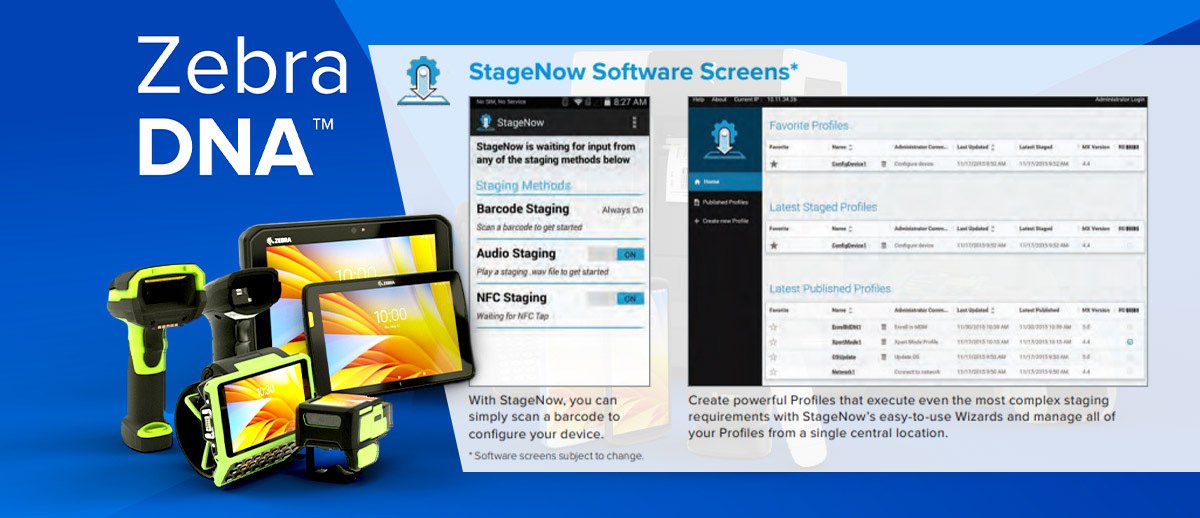
What is Zebra StageNow?
Zebra StageNow (sometimes written as Zebra Stage Now) is a free configuration and staging tool designed specifically for Zebra Android mobile computers. Using a wizard-driven interface, IT administrators can create configuration profiles—containing Wi-Fi credentials, VPN details, app installations, security restrictions, and more—and convert those profiles into a 2D barcode or QR code.
Any Zebra device placed in staging mode can scan this barcode to instantly adopt the required configuration. In just seconds, a device is set up and ready for use—without the manual steps of entering passcodes, downloading apps, or setting policies one by one.
The Challenges StageNow Solves
Zebra created StageNow to tackle some of the most common pain points that enterprises face when working with rugged Android devices:
- Slow, Manual Deployments
Configuring each Zebra mobile computer individually can take 30–60 minutes. Multiply that across hundreds of units, and deployment becomes a weeks-long project. StageNow reduces this to a matter of minutes per batch. - Inconsistent Zebra Scanner Settings
When staging is done manually, there’s a risk that different devices end up with slightly different Zebra scanner configurations. This inconsistency can cause workflow interruptions, lost scans, and frustrated end users. StageNow ensures every unit is configured identically. - Delays After Repairs
Enterprises often rotate devices through repair cycles. When repaired units return, they usually arrive wiped clean. StageNow allows organizations to instantly restore the proper Zebra device settings and push them back into production without wasting time. - IT Bottlenecks
Skilled IT teams shouldn’t be tied up with repetitive staging tasks. By automating the process, StageNow frees IT staff to focus on higher-value projects like security, analytics, and process optimization.
Real-World Applications of Zebra StageNow
- Mass Deployment of New Devices
Imagine a national retailer deploying 1,500 new Zebra TC53 and TC58 mobile computers across 250 stores. Without automation, configuring each device would require an enormous IT investment. With StageNow, IT simply creates one staging profile for store operations, prints the QR code, and has store staff scan it. Every device in the rollout is configured identically and ready for use in under 10 minutes. - Reintegrating Repaired Devices
A warehouse operation might cycle dozens of MC9400 handhelds through repair every month. When they come back, workers don’t need to call IT or wait for remote management. Instead, they scan the StageNow barcode for their department, and the handheld is immediately restored to its proper configuration. - Managing Department-Specific Settings
Not every department uses devices the same way. A hospital, for example, might configure Zebra TC21 devices for nurses with HIPAA compliance settings, while housekeeping staff use a simpler configuration for task tracking. StageNow makes it easy to create multiple profiles and manage Zebra mobile computer configurations by department.

Is Zebra StageNow Free?
Yes. StageNow is included at no additional cost as part of Zebra Mobility DNA—Zebra’s suite of software, utilities, and applications that extend the functionality of Zebra hardware. Unlike many third-party mobile device management tools, there are no licensing fees or hidden costs for using StageNow.
Ease of Learning and Use
StageNow was designed for simplicity. Even IT staff without scripting experience can quickly create staging profiles thanks to a step-by-step, wizard-based interface.
- Profile creation: Select which settings to include (Wi-Fi, security certificates, applications, restrictions, etc.).
- Barcode generation: StageNow generates a 2D barcode or QR code representing that configuration.
- Device staging: Put a Zebra mobile computer into staging mode, scan the barcode, and within moments the device automatically applies all settings.
Organizations can create multiple barcodes for different configurations, making it easy to manage diverse environments. For example, a logistics company might have one staging code for drivers and another for warehouse staff.
How StageNow Works – Step by Step
- Define Requirements
IT determines the necessary Zebra device configuration: Wi-Fi credentials, VPN settings, enterprise app installs, device restrictions, etc. - Create the Profile
Using the StageNow console, IT builds a profile containing these requirements. - Save & Generate Barcode
StageNow saves the profile and produces a scannable barcode. This barcode can be printed or shared digitally. - Scan to Apply Settings
Any Zebra device in staging mode scans the barcode and automatically adopts the configuration. - Deploy Consistently
This process is repeatable across hundreds or thousands of devices, ensuring uniform Zebra scanner settings and device behavior.

Do You Need a Zebra Specialist to Use StageNow?
No. StageNow was built for self-service and can be used by IT teams directly. However, Zebra solution specialists or partners can add value by:
- Advising on complex enterprise rollouts
- Helping design multi-department staging profiles
- Integrating StageNow with existing device management workflows
- For most businesses, StageNow is easy enough to implement without external help, but having a Zebra partner available provides peace of mind.
Customer Experiences and Benefits
Customer reviews consistently highlight the following benefits:
- Time savings: Deploy devices 80–90% faster compared to manual setup.
- Error reduction: Eliminate misconfigured devices that cause downtime.
- Scalability: Deploy 50 devices or 5,000 devices with the same process.
- Faster ROI: Reduce IT labor costs associated with mobile device management.
- Reliability: Workers get consistent, predictable experiences across all devices.
Organizations in retail, logistics, healthcare, and manufacturing repeatedly affirm that StageNow is one of the most valuable free tools in the Zebra Mobility DNA portfolio.
If your business uses Zebra mobile devices, scanners, or rugged computers, Zebra StageNow is an essential tool. It simplifies deployments, accelerates reintegration of repaired devices, ensures consistent Zebra scanner configurations, and eliminates IT bottlenecks—all at no additional cost.
Whether you’re rolling out thousands of new devices, configuring department-specific profiles, or just keeping your workforce productive, StageNow is the fastest and most reliable way to manage Zebra device settings at scale.
Talk to an Expert