
How Long Should a Zebra Printhead Last and What Cuts That Life Short
Posted by The ZPS Store on Jun 9th 2026

By The ZPS Store | Printer Maintenance | Zebra Printhead Life Guide
The printhead is the most consumed component in any thermal printer. Every label you print passes a current through hundreds of tiny heating elements arranged in a line across the print width, and each of those elements experiences a small amount of wear every time it fires. That wear is gradual and normal. The printhead does not fail all at once. It degrades. First-pass scan rates drop a little. Solid fills get slightly less uniform. Fine text starts to look soft. Then one day a label comes out with a consistent white streak, and a heating element is gone.
What most operations do not realize is that the rate of that degradation is not fixed. It varies significantly based on how the printer is configured, what supplies are running through it, and how it is maintained. A printhead running at the correct darkness setting on correctly matched ribbon and media will reach its rated life. A printhead running too hot on the wrong ribbon will reach that same failure point at a fraction of the miles. The decisions that determine which outcome you get are mostly made at setup and rarely revisited.
How Long a Zebra Printhead Should Last
What is the rated life of a Zebra printhead?
Zebra warrants all of its current printheads for one year or one million linear inches of printing, whichever comes first. This applies across the full lineup including the ZD421, ZD621, ZT231, ZT411, ZT421, ZT610, and ZT620 printheads sold at The ZPS Store.
One million linear inches sounds like a large number. In practical terms it translates directly to your daily label volume and your average label length. A printer producing 4x6 shipping labels is printing 6 linear inches per label. At 1,000 labels per day that is 6,000 linear inches per day. One million inches divided by 6,000 inches per day is about 167 days, or roughly 5 to 6 months of production. At 2,000 labels per day the same math produces 83 days.
For a printer running shorter labels the calculation is more favorable. A printer producing 4x2 inventory labels at the same 1,000 labels per day is printing 2,000 linear inches per day, which gives a rated life of 500 days before the million-inch mark. Operations that run high daily volumes on short labels get significantly more use from a printhead than operations running the same volume on long shipping labels.
The practical planning implication is this: if you are running high volumes you should be budgeting printhead replacement as a predictable annual or semi-annual cost rather than treating it as an unexpected expense. A printhead that has reached its rated life and is replaced on schedule causes no downtime. A printhead that reaches the same point unnoticed causes a production stop and an emergency order.
How do you check how many inches a Zebra printhead has printed?
Zebra industrial printers including the ZT231, ZT411, ZT421, ZT610, and ZT620 track printhead mileage on an odometer counter accessible through the printer menu. On ZT-series touchscreen printers navigate to the Home menu, then select About, then select Printer Info or Odometers depending on your firmware version. The display shows total inches printed on the current printhead along with the total for the printer's lifetime. This gives you an exact reading of where the current printhead is relative to its one million inch rated life.
ZD-series desktop printers also track print mileage through the printer's web interface when connected via Ethernet or Wi-Fi, accessible by entering the printer's IP address in a browser. The printer status page shows total label count and print length data that can be used to calculate where the printhead stands relative to its rated life.
Checking these numbers periodically and noting the rate of progress toward the million-inch mark is the simplest form of printhead lifecycle management. An industrial printer approaching 800,000 inches should have a replacement printhead on order. A printer at 400,000 inches can continue without concern for several more months. The counter makes the decision concrete rather than guesswork.
What Cuts Printhead Life Short
How does the darkness setting affect printhead wear?
This is the most important relationship between printer settings and printhead longevity, and it is almost never discussed at the time of initial printer setup. Zebra's own documentation states explicitly that the darkness setting should be set to the lowest level that produces good print quality. That guidance exists specifically because higher darkness settings mean more heat per dot, and more heat per dot means faster wear on the heating elements.
In practice, many printers are set to a darkness level that produces visually acceptable output rather than the minimum effective level. A label that looks slightly darker than necessary still looks fine to the person picking it up. The difference between darkness 14 and darkness 20 on most Zebra printers is not visible in normal use. But that difference represents a meaningful increase in thermal energy applied to each heating element on every dot it fires, compounded across millions of labels. It is the single easiest adjustment to make that extends printhead life without any cost or tradeoff in label quality.
The correct process for setting darkness is to use Zebra's FEED self-test, which prints a range of labels at different darkness levels so you can identify the lowest setting that produces complete, clean output for your specific ribbon and media combination. Our darkness settings guide covers this process in detail if you want the full walkthrough.
What is printhead glazing and why does it happen?
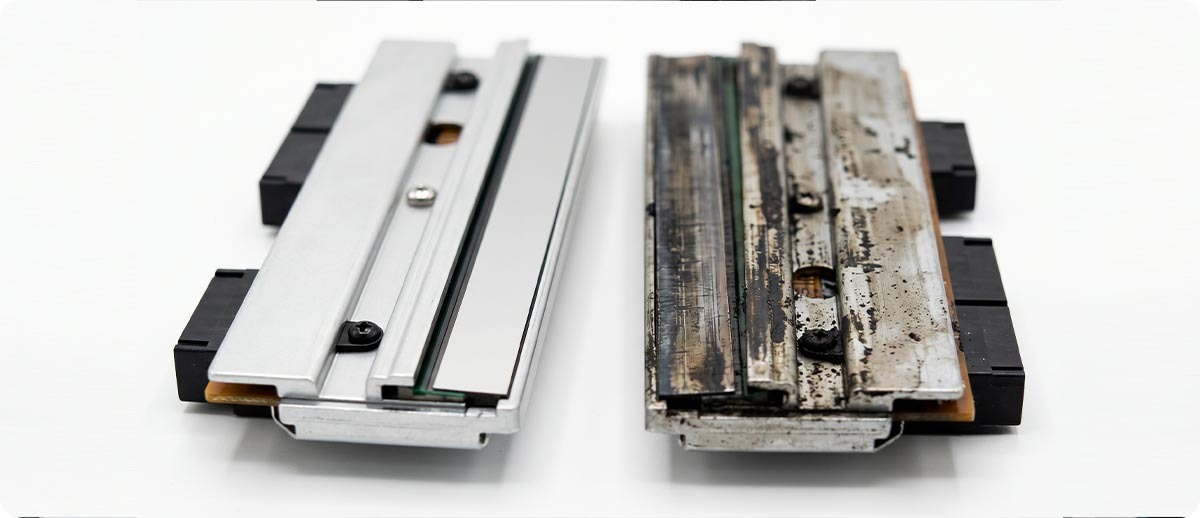
Printhead glazing is a buildup of wax or resin deposits on the surface of the printhead that develops when ribbon ink is melted but not transferred cleanly to the label. The residual ink bakes onto the printhead face under repeated heat cycles and forms an insulating layer over the heating elements. Glazed elements cannot transfer heat efficiently, so the printer compensates with higher darkness settings to get acceptable output, which generates more heat, which bakes more residue. The cycle accelerates printhead wear and eventually produces the streaked, inconsistent output that signals the printhead is near end of life.
Glazing is caused by three things: running darkness higher than necessary (which over-melts ribbon ink and creates excess residue), using a ribbon type that does not match the media (which produces incomplete ink transfer and more residue), and infrequent cleaning that allows residue to accumulate before it is removed. Regular cleaning with an IPA wipe removes the residue before it bakes in. Our printhead cleaning guide covers the correct cleaning procedure and frequency.
Why should you never touch a printhead with bare fingers?
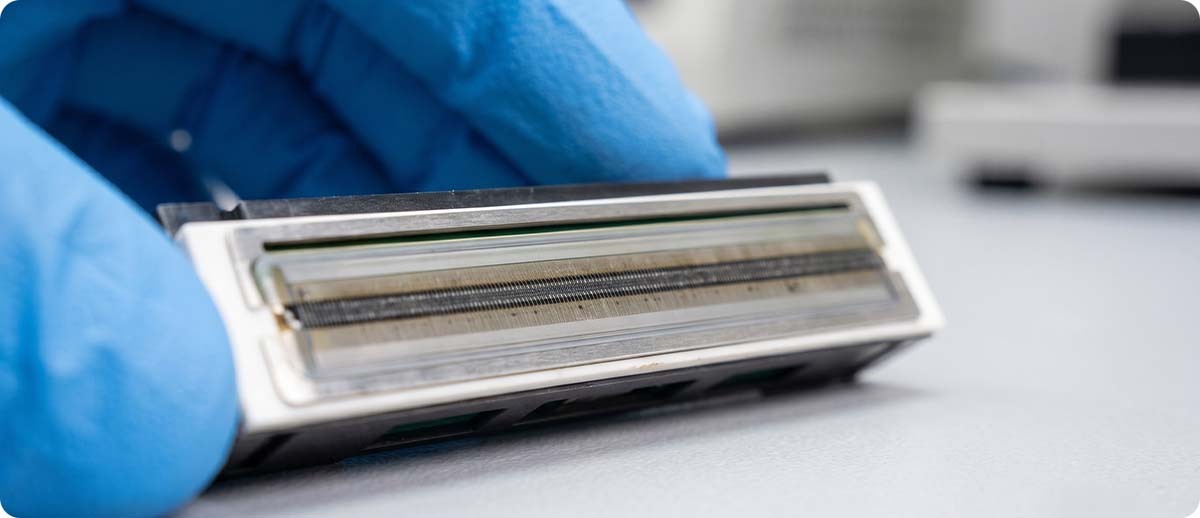
The heating elements on a printhead are coated with a protective layer that insulates and protects them from abrasion and corrosion. Skin oils from bare fingertips break down that coating over the contact area, leaving the elements exposed to the heat, abrasion, and chemical environment of the print path. The damage from a single careless touch is not visible immediately. It develops over subsequent print cycles as the unprotected area degrades faster than the surrounding coated surface.
This matters most during media loading, ribbon loading, and cleaning. These are the moments when people are most likely to contact the printhead face while reaching into the printer. Building the habit of handling the printhead by its edges or frame rather than its printing surface is low cost and genuinely extends the life of the component.
Does running the wrong ribbon shorten printhead life?
Yes, in two distinct ways. The first is through the glazing mechanism described above. A ribbon that does not transfer cleanly to the label because of a chemistry mismatch leaves residue on the printhead face on every print cycle. A wax ribbon run on synthetic label stock that requires a resin ribbon is a common example. The ink does not bond properly to the facestock and excess ink accumulates on the printhead.
The second way is through the backcoat interaction. Thermal transfer ribbons have a backcoat on the side that contacts the printhead. This backcoat lubricates the printhead face and reduces friction as the ribbon travels across it. A ribbon with a poor or incompatible backcoat increases friction between the ribbon and the printhead, producing a grinding effect on the heating element coating over millions of passes. Zebra-certified ribbons are formulated with backcoats matched to Zebra printhead materials. Non-certified ribbons vary in backcoat quality and composition, and some are measurably harder on printhead surfaces.
Does running the wrong IPA concentration damage the printhead during cleaning?
This is a question worth answering clearly because it catches people off guard. The correct IPA concentration for Zebra printhead cleaning is 99 percent isopropyl alcohol. Standard 70 percent isopropyl, which is what most first-aid kits and many cleaning supply cabinets stock, contains 30 percent water. Water introduced to printhead electronics causes corrosion and can damage the element bonding wires. Zebra's cleaning kits and cleaning wipes use the correct 99 percent concentration. If you are using anything other than a product specified for printhead cleaning, verify the IPA concentration before applying it.
The Cost of Getting It Wrong
A Zebra ZT411 printhead runs between $200 and $400 depending on DPI and configuration. A ZT610 printhead is higher. For a single printer, replacing a printhead that reached its rated life on schedule is a budgeted maintenance expense with no operational impact. For a fleet of 10 or 20 printers, the printhead budget across a year is a meaningful line item, and the difference between printheads that reach their rated life and printheads that fail early multiplies across the fleet.
The hidden cost that rarely gets counted is the cost of unplanned printhead failures. A printhead that fails mid-shift stops a printer and starts a clock. If a spare printhead is not in stock, that printer is down until a replacement arrives. At two-day shipping, a printer that fails on Monday morning may not be back in production until Wednesday. For high-volume printing stations, the cost of that downtime in delayed shipments, production backlog, and labor workarounds can easily exceed the cost of the printhead itself.
Operations that check printhead odometers quarterly, keep one spare printhead per model family in stock, and replace approaching-end-of-life printheads during planned downtime rather than emergency periods consistently spend less on printhead maintenance over a three-year period than operations that manage printhead replacement reactively.
Zebra Printheads and Cleaning Supplies at The ZPS Store
Every printhead at The ZPS Store is sourced directly from Zebra Technologies. All are genuine OEM, factory sealed, and carry Zebra's standard one year or one million inch warranty. We carry printheads for every current and recently discontinued Zebra desktop and industrial model.
Industrial Printheads
ZT411 / ZT421 Series: 203 DPI, 300 DPI, and 600 DPI configurations
ZT610 / ZT620 Series: 203 DPI, 300 DPI, and 600 DPI configurations
ZT230 / ZT231 Series: 203 DPI and 300 DPI configurations
Shop Industrial Printheads →Desktop Printheads
ZD420 / ZD421 Series: direct thermal and thermal transfer configurations
ZD620 / ZD621 Series: direct thermal and thermal transfer configurations
Shop Desktop Printheads →Printhead Cleaning Supplies
44902: Zebra Printhead Cleaner Kit (4.2"), IPA wipes formulated for 4-inch printhead cleaning
105950-033: Zebra Printhead Cleaning Cards, 2" (Box of 25)
105950-048: Zebra ZD410 Series Printhead Cleaning Cards
Shop Cleaning Supplies →
Frequently Asked Questions
My ZT411 has printed 1.2 million inches. Should I replace the printhead even if it still looks fine?
Yes, and soon. The one million inch figure is the warranty boundary, not the point at which the printhead will suddenly fail. Some printheads continue producing acceptable output past one million inches under favorable conditions. But a printhead past its rated life is operating without the backing of the Zebra warranty and at an elevated risk of failure. At 1.2 million inches the risk is meaningful. If this printer is in a production-critical position, replacing the printhead proactively during planned downtime is a better outcome than waiting for a failure during an active print run. The cost of the replacement is the same either way, but the timing makes a significant operational difference.
Is a generic or aftermarket Zebra printhead a reasonable alternative to OEM?
Generic printheads exist at lower price points than OEM Zebra printheads and are marketed as compatible replacements. The concern with generic printheads is not whether they physically fit but whether the heating element quality, protective coating, and element spacing match Zebra's specifications closely enough to produce equivalent output quality and equivalent wear life. Zebra does not test or certify third-party printheads, and the warranty that covers OEM Zebra printheads does not apply to aftermarket alternatives. Every printhead sold by The ZPS Store is genuine Zebra OEM because that is the only way we can stand behind the performance and the warranty coverage. If you are evaluating a lower-cost alternative, the correct comparison is not the upfront purchase price but the full cost per million inches of use including any quality or longevity difference.
We run direct thermal labels with no ribbon. Does the printhead still wear the same way?
The wear mechanism is somewhat different in direct thermal printing but the life rating applies equally. In direct thermal printing the label facestock passes directly over the printhead with no ribbon as a buffer layer between them. The label surface has a slightly abrasive effect on the printhead coating over millions of passes. Direct thermal printing also tends to require a slightly lower darkness setting than thermal transfer for equivalent output since the heat activates the label coating directly. Running direct thermal at higher-than-necessary darkness accelerates printhead wear through the same excess heat mechanism as in thermal transfer. The key practices of correct darkness setting, regular cleaning, and no finger contact on the element surface apply equally to both print modes.
How do I know if declining print quality is a printhead issue or something else?
The diagnostic sequence to distinguish printhead wear from other causes starts with cleaning. Clean the printhead with the correct IPA wipe and run a test label. If quality improves significantly, residue buildup was the cause and the printhead may have more useful life remaining. If quality does not improve after cleaning, check the darkness setting and run a FEED self-test to evaluate whether recalibrating to a lower darkness restores quality. If neither cleaning nor darkness adjustment improves output, and the printer has significant mileage on the odometer, printhead wear is the likely cause. A consistent white streak at the same position on every label is a dead heating element regardless of cleaning or darkness, and that element cannot be restored.
If you want to check which printhead fits your specific printer model and DPI configuration, or if you are evaluating whether it makes sense to keep a spare in stock for your volume level, our team can help. Fill out the form below and we will point you to the right part before you need it urgently.