
How Many Labels Per Roll? The Number That Affects Your Roll Changes, Storage, and Supply Orders More Than You Think
Posted by The ZPS Store on Sep 14th 2026

By The ZPS Store | Label Buying Guide | Labels Per Roll Explained
This isn't a complicated topic but it's one that trips up a surprising number of buyers, especially operations moving from low-volume to high-volume printing or switching between printer types. The three numbers that determine how many labels are on a roll are the label size, the core diameter, and the outer roll diameter. Understanding how they interact tells you everything you need to know before you order.
The Three Numbers That Determine Labels Per Roll
What is the core diameter and why does it matter?
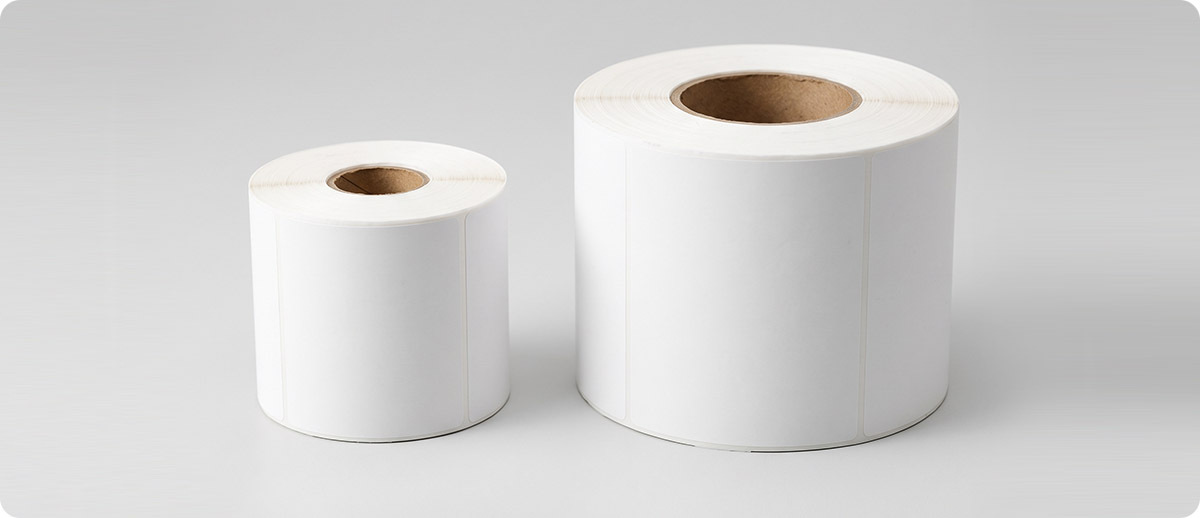
The core is the cardboard tube at the center of the label roll that the media is wound around. Core diameter is measured in inches across the inside of that tube. The most common core sizes are 1-inch and 3-inch.
Desktop printers like the Zebra ZD421 and ZD621 typically accept 1-inch cores. Industrial printers like the Zebra ZT411 and ZT421 accept both 1-inch and 3-inch cores, with most industrial rolls using 3-inch cores because they allow more media to be wound onto a roll of the same outer diameter. A 3-inch core takes up more space at the center of the roll, but industrial printers are specifically designed to handle larger outer roll diameters that more than compensate for the larger core.
What is the outer diameter and how does it relate to labels per roll?
The outer diameter is the total diameter of the roll including all the wound label media. A 5-inch OD roll and an 8-inch OD roll of the same label in the same material have very different amounts of media on them. The space between the core and the outer diameter is where the labels live, and more of that space means more labels per roll.
Desktop printers typically accept rolls up to 5 or 5.5 inches OD. Industrial printers accept rolls up to 8 or 10 inches OD. This is the primary reason industrial printers produce fewer roll changes per shift in high-volume operations: they hold significantly more media per roll, not just because of the larger OD but because the combination of a 3-inch core and an 8-inch OD creates a much larger label capacity than a 1-inch core at 5-inch OD.
How does label size affect labels per roll?
Smaller labels fit more per roll than larger labels on the same core and OD combination. A 2x1-inch inventory tag fits significantly more per roll than a 4x6-inch shipping label wound on the same roll geometry. This is why label specification sheets always list labels per roll alongside the size, core, and OD information. The label size is the third variable that determines the final count.

What the Numbers Look Like in Practice
How many labels are on a standard 4x6 shipping label roll?
Here is exactly what the confirmed Zebra label rolls on ZPS show for the same 4x6 label size at different core and OD specifications:
| Label | Core | OD | Labels Per Roll | Printer Type |
|---|---|---|---|---|
| Z-Select 4000D 4x6 DT | 1 inch | 5 inch | 475 | Desktop |
| Z-Select 4000T 4x6 TT | 3 inch | 8 inch | 950 | Industrial |
| Z-Select 4000T Removable 4x6 TT | 3 inch | 8 inch | 1,000 | Industrial |
| PolyPro 3000T 4x6 TT | 1 inch | 5 inch | 390 | Desktop |
| Z-Select 4000D 4x6 Fanfold | N/A | N/A | 720 per stack | Desktop or industrial |
The same 4x6 label at the same quality tier holds 475 labels on a desktop roll and 950 labels on an industrial roll. That's exactly double the labels per roll, which means half the roll changes for the same print volume on an industrial printer. For a shipping operation printing 1,000 labels per shift, a desktop printer requires more than two roll changes per shift. An industrial printer on the same volume requires one roll change per shift or less.
Why Labels Per Roll Matters for Your Operation
How do you calculate how many rolls you need per shift or per day?
The math is straightforward. Take your daily label volume and divide by the labels per roll for the media you're ordering. That gives you rolls per day. Multiply by working days per month for your monthly order quantity, then add a buffer for partial rolls and unexpected volume spikes. Most operations order enough for 30 days plus a 10 to 15 percent buffer.
Where operations get this wrong is using a different roll count than what's actually in the product they're ordering. Label product listings show labels per roll in the specifications. If you're buying a case of 12 rolls at 475 labels per roll, you have 5,700 labels per case. If you're buying a case of 4 rolls at 950 labels per roll, you have 3,800 labels per case but at a significantly larger roll size that changes storage requirements and order frequency. Checking the per-roll count before ordering rather than just the case price is the difference between an order that lasts three weeks and one that lasts two.
Does higher labels per roll always mean better value?
Not always. Higher labels per roll means larger rolls, which require a printer that accepts the larger core and OD. A 950-label industrial roll doesn't fit in a desktop printer. Ordering the wrong roll for your printer means the roll doesn't load correctly, which causes feed errors and media jams that cost more in downtime than the extra labels per roll save in roll changes.
Storage is also a factor. Larger rolls take more shelf space. For operations with limited label storage near the printer, high-count rolls that reduce order frequency may create a storage problem that offsets the convenience benefit. The right labels per roll is the one that matches your printer's specifications, your shift volume, and your storage situation, not necessarily the highest count available.
What about fanfold labels? How do those compare to rolls?
Fanfold labels are the same label media folded in a continuous accordion stack rather than wound on a core. They load from an external box rather than a roll holder inside the printer, which means the stack can be very large without needing to change the roll. Fanfold is particularly useful when the printer is positioned inside a cabinet or enclosure where loading a large roll is physically difficult, or when the label supply needs to be fed from below the printer.
A 4x6 fanfold stack holds 720 labels per stack on ZPS, which is more than a desktop roll at 475 but less than an industrial roll at 950. Fanfold eliminates the roll core entirely, which means no core disposal or recycling to manage, and the flat stack is sometimes easier to store than curved rolls. Not every printer supports fanfold media loading, so confirm your printer's fanfold compatibility before ordering.
Shop Labels at The ZPS Store
Zebra Z-Select 4000D (Direct Thermal, Desktop Roll)
10015347: 4x6, 1-inch core, 5-inch OD, 475 labels per roll, 12 rolls per case
83398-EA: 4x6, fanfold, 720 labels per stack
Shop Z-Select 4000D →Zebra Z-Select 4000T (Thermal Transfer, Industrial Roll)
72353: 4x6, 3-inch core, 8-inch OD, 950 labels per roll, 4 rolls per case
10005486: 4x6, Removable, 3-inch core, 8-inch OD, 1,000 labels per roll, 4 rolls per case
Shop Z-Select 4000T →Quick Questions
My ZD421 only accepts 1-inch cores. Can I use industrial rolls?
No. The ZD421 has a maximum roll OD of approximately 5 inches and a 1-inch core holder. Industrial rolls on 3-inch cores with 8-inch OD simply don't fit. If you need more labels per roll to reduce change frequency on a ZD421, fanfold at 720 labels per stack is the highest-count option available for a desktop printer without moving to an industrial printer.
The labels per roll on two products look the same but the price is different. Why?
Price per roll varies by material, coating, adhesive type, and perforations. A Z-Select 4000D (direct thermal, standard paper) at 475 labels per roll costs less than a Z-Ultimate 4000T (polyester, permanent acrylic, chemical resistant) at a similar count because the materials and manufacturing are different. The labels per roll comparison is useful for planning roll change frequency, but price per roll comparisons need to account for what the material is, not just how many are on the roll.
How do I know which core size my printer uses?
Check your printer's spec sheet or media specifications section in the user guide. It will list the accepted core diameters and maximum roll OD. If you're not sure, the quickest check is to measure the inside diameter of the last empty core from a roll that loaded correctly in your printer. That measurement is your core size. If you tell us your printer model we can confirm the right roll specification before you order.
If you're not sure which label roll specification is right for your printer and your daily volume, fill out the form below and tell us your printer model and approximate daily label count. We can confirm the right roll configuration and help you calculate your order quantity before you commit to a case purchase.