
Missing Devices Cost More Than You Think: A Practical Fleet Management Guide for Zebra Operations
Posted by The ZPS Store on Aug 28th 2026

By The ZPS Store | Fleet Management | Zebra Device Accountability Guide
We have a separate guide on how to find a lost scanner once it's already missing using Zebra Device Tracker. This guide takes a step back and covers the bigger picture: how to build the processes and tools that make device loss less likely in the first place, and how to know a device is missing before someone reports it at shift change.
Where Devices Actually Go
Why do enterprise mobile devices go missing so often?
The device didn't disappear. Someone set it down somewhere logical at the time, got pulled away, and it sat there through one or two shift changes while everyone assumed someone else had it. By the time the next operator goes looking for it, it's been moved twice, put in the wrong cradle in a different department, slid under a shelving unit, or left in a break room. None of this is theft. It's just the natural friction of a busy operation without a clear device accountability process.
The cost isn't just the replacement device. It's the supervisor time spent searching before concluding it's really gone. It's the worker standing idle waiting for a device. It's the repair paperwork, the insurance claim process, and the operational disruption of being a device short during a peak period. And when devices are frequently missing, it signals a broader fleet management gap that tends to get worse before anyone addresses it systematically.
The Process Side: What Good Device Accountability Looks Like
What does a basic device check-in and check-out process actually require?
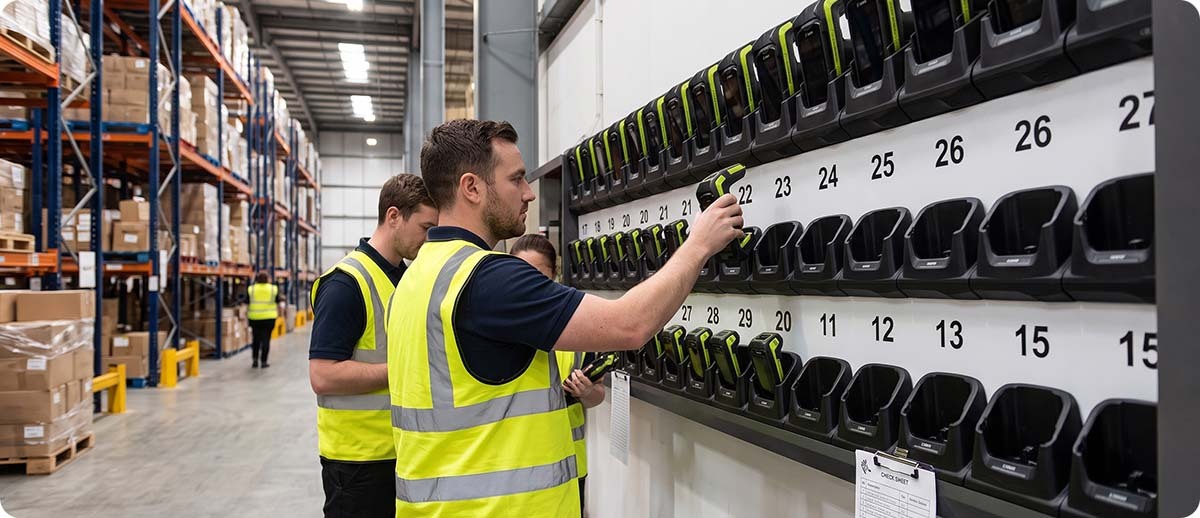
It doesn't need to be complicated. The minimum effective version is a named cradle assignment system where each cradle or charging slot has a device serial number associated with it, and shift supervisors verify that every device is in its assigned slot before signing off on shift change. When a device is missing from its slot, it's immediately visible rather than discovered hours later.
Some operations go further with a sign-out log where workers record which device they're taking at the start of a shift and return it to the same spot at the end. For smaller fleets this is entirely manual and still dramatically reduces the "where did it go?" problem because there's a named person associated with every device at every moment. For larger fleets, this process can be automated through barcode scan-based check-out systems tied to worker badges or employee IDs.
The single highest-impact process change most operations can make is simply assigning devices to individuals or specific roles rather than treating them as a communal pool. When a specific person is responsible for a specific device, loss rates drop significantly because accountability is personal rather than collective.
How does labeling and asset tagging help?
Every device in your fleet should have a visible asset tag with a unique identifier and your organization's name or contact information. This sounds basic but a significant portion of "lost" enterprise devices end up in another department, another facility, or a vendor's possession simply because nothing on the device identifies where it belongs. An asset tag with a barcode tied to your inventory system also makes receiving a returned device straightforward since anyone who finds it can scan the tag and know exactly where it goes.
The Software Side: Knowing Where Devices Are Before They Go Missing
What does Zebra DNA Cloud tell you about your fleet?
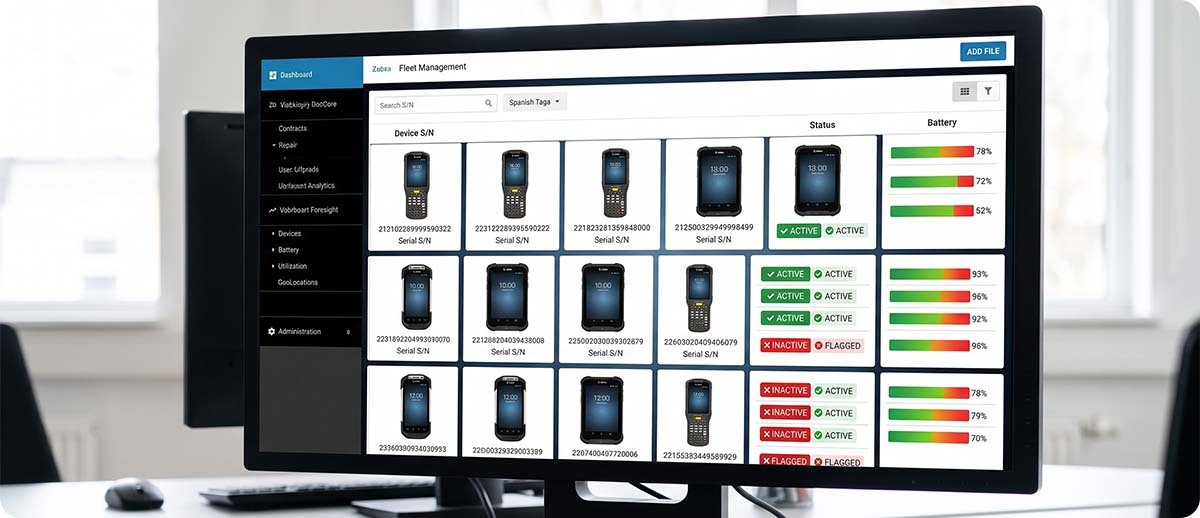
Zebra DNA Cloud gives IT administrators a centralized real-time dashboard showing the status of every managed Zebra device in the fleet. That includes whether each device is active or inactive, its battery health and current charge level, the Android OS version installed, and device serial numbers. The dashboard refreshes regularly so you're looking at current fleet state rather than a snapshot from a week ago.
The practical fleet management value of this is that you can see which devices have been offline for an unusually long time before a supervisor reports one missing. A device that was active yesterday morning and hasn't appeared on the network since noon is either dead, in a location without Wi-Fi coverage, or missing. Knowing that today rather than discovering it at shift change tomorrow gives you a much better window to find it before it genuinely disappears. DNA Cloud also handles LifeGuard OTA security updates fleet-wide, which keeps devices from accumulating security vulnerabilities that eventually require removal from service.
What does PowerPrecision Console do and how does it reduce device loss?
PowerPrecision Console is a free PC-based battery management tool from Zebra that gives you a dashboard view of battery health across your entire fleet. It identifies aging batteries that are no longer holding adequate charge before they affect productivity, so you can remove them from the battery pool proactively rather than discovering a dead battery mid-shift.
The connection to device loss is real. A device with a failing battery that dies mid-shift gets set down somewhere while the worker goes to find a replacement. That device then sits in a non-standard location uncharged and off the network, which is exactly the scenario that turns into a "missing device" report at shift change. Staying ahead of aging batteries with PowerPrecision Console reduces the frequency of this specific scenario throughout the fleet.
When does Zebra Device Tracker fit into this picture?
Device Tracker is the reactive layer. When a device isn't in its assigned slot and isn't showing on the DNA Cloud dashboard as active, Device Tracker is the tool that physically locates it using BLE proximity and audio chirp. We cover Device Tracker in detail in a separate guide. The key point here is that Device Tracker works best as a last resort that's rarely needed, because the process and proactive software layers above it have already reduced how often a device goes truly missing rather than just being temporarily misplaced.
Protecting the Investment: Zebra OneCare
Device loss is one risk to your hardware investment. Damage, wear, and unexpected repair costs are the others. Zebra OneCare service contracts cover repair and replacement including accidental damage and wear and tear, with three-day repair turnaround and cloud-based visibility into repair status through VisibilityIQ OneCare. For fleets where device downtime is operationally costly, OneCare converts unpredictable repair expenses into a known per-device annual cost that's much easier to budget around than surprise replacement bills.
OneCare also includes phone support from the team that built the devices, which is meaningfully different from generic IT support when the issue is Zebra-specific. For operations that don't have deep Zebra expertise on staff, OneCare's support access is worth factoring into the total fleet management cost picture.
Quick Questions
We only have 20 devices. Is a formal fleet management process worth the overhead?
At 20 devices the formal software layer is probably overkill. A named cradle assignment system and a shift-change device count takes less than five minutes and covers the most common loss scenarios without any software investment. PowerPrecision Console is free and worth running regardless of fleet size since aging batteries are a real productivity problem at any scale. DNA Cloud and Device Tracker start earning their cost at larger fleet sizes where manual tracking becomes genuinely impractical.
How does DNA Cloud know when a device has gone offline?
DNA Cloud tracks device check-ins from managed Zebra devices over Wi-Fi. When a device hasn't checked in within its expected window, it shows as inactive in the dashboard. The dashboard doesn't require a special agent or app beyond the standard Zebra Mobility DNA software stack that runs on all current Zebra Android devices, which means most current Zebra TC and MC series devices can be added to DNA Cloud management without additional software installation on the device itself.
What is the difference between DNA Cloud and Device Tracker?
DNA Cloud is a fleet management platform that gives you visibility into what every device is doing across your operation at the level of status, health, and configuration. Device Tracker is specifically a device location tool that helps you physically find a device that has gone missing within your facility. They complement each other. DNA Cloud tells you a device has been offline longer than expected. Device Tracker tells you physically where it is. Running both gives you the proactive visibility and the reactive location capability as a complete system.
If you want to talk through which parts of this fleet management stack make sense for your operation size and device mix, fill out the form below. We can help you figure out what's worth implementing now and what you can add later as your fleet grows.