
Why ZebraDesigner Pro Is the Right Label Software for Your Zebra Printer (And When Third-Party Tools Make Sense)
Posted by The ZPS Store on Sep 29th 2026
By The ZPS Store | Label Software | ZebraDesigner vs. BarTender vs. Loftware
We covered ZebraDesigner Pro V3's features in a separate guide. This blog is specifically about the software decision: ZebraDesigner, BarTender, or Loftware. If you're running Zebra printers and you're trying to figure out which label software to buy, this is the comparison that answers it directly.
What Each Software Is Built For
ZebraDesigner Pro: built specifically for Zebra printers
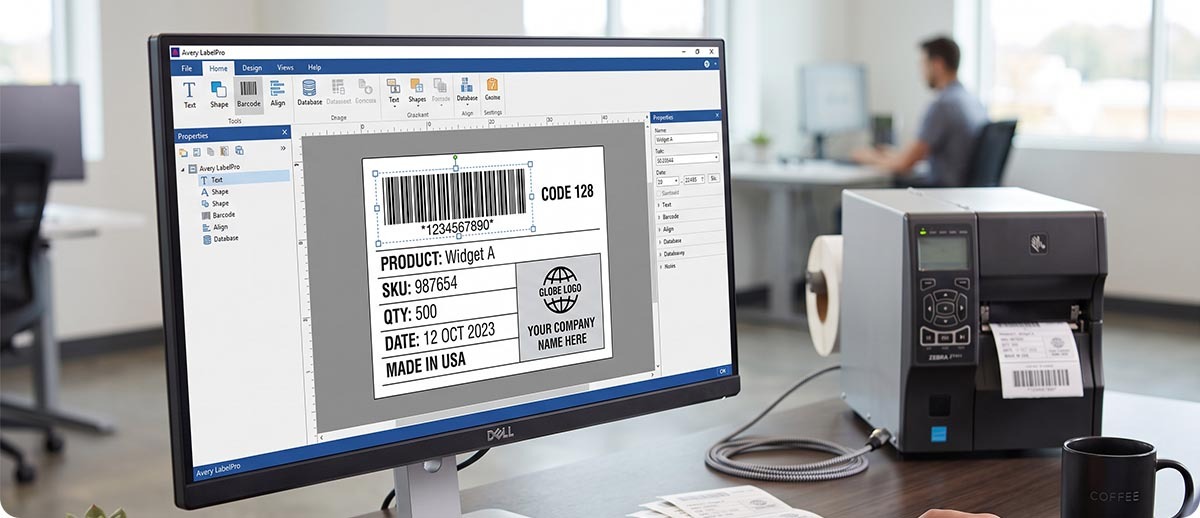
ZebraDesigner is Zebra's own label design software, part of the Zebra DNA for Printers platform. It was built by the same company that built your printer, for the specific purpose of getting the best output from Zebra hardware. It communicates with Zebra printers natively in ZPL, the Zebra Programming Language, without any translation layer or compatibility workaround between the software and the printer.
The practical result of that native integration is that ZebraDesigner has access to Zebra printer features that third-party software may not expose or may implement through workarounds. RFID encoding through the built-in RFID wizard, printhead density optimization, darkness calibration settings, and Zebra's specific media sensor configurations are all handled directly within ZebraDesigner because the software knows the printer's full capability at a level a third-party tool can't fully replicate.
ZebraDesigner comes in two tiers. The free Essentials version handles straightforward label design without cost. ZebraDesigner Professional V3 is a one-time perpetual license purchase, not a subscription, that adds database connectivity, RFID encoding, advanced variable data, GS1 compliance, SAP integration, and a full set of professional labeling tools. For most operations running Zebra printers exclusively, Professional V3 covers every labeling requirement they have.
BarTender: built for multi-brand enterprise deployments
BarTender is a label management platform from Seagull Scientific. It's a genuinely capable product with deep enterprise features: centralized label version control, role-based access, audit trails for regulated industries, multi-site deployment management, and broad printer support across Zebra, Honeywell, SATO, and virtually every other major printer brand.
BarTender is subscription-based and priced at enterprise tier, meaning the annual cost is significantly higher than ZebraDesigner Professional's one-time purchase. It makes that cost back for operations where the enterprise features are genuinely used: large multi-site deployments with multiple printer brands, regulated industries requiring label version control and audit trails, and IT organizations that need centralized label governance across many users and locations. For a single-site Zebra-only operation printing standard inventory and shipping labels, BarTender's enterprise feature set is more than the operation will ever use and the price reflects capabilities that won't be touched.
Loftware: built for enterprise supply chain compliance
Loftware (which acquired NiceLabel in 2022) is the most enterprise-focused of the three. Loftware Cloud and Loftware Spectrum are designed for large, complex supply chain labeling environments: multinational companies managing compliance labels across multiple countries and regulatory regimes, pharmaceutical operations with serialization and track-and-trace requirements, and retail suppliers managing GS1 compliance labeling across multiple retailer partners simultaneously.
The price reflects that complexity. Loftware is typically the highest-cost option of the three and is genuinely worth that cost for the operations it's designed for. For a mid-size warehouse running Zebra printers and printing shipping and inventory labels, Loftware is a significant investment in capabilities that won't be used. It's the right tool for a specific type of large, regulated, compliance-driven operation.
The Honest Comparison for Zebra-Only Operations
What does ZebraDesigner do that BarTender and Loftware can't match on a Zebra printer?
Native ZPL output. ZebraDesigner writes ZPL natively. BarTender and Loftware generate ZPL through their own print engines. For most standard labels this produces identical results. For labels that push the edges of Zebra's formatting capabilities, native ZPL from ZebraDesigner reliably produces cleaner output than ZPL generated by a third-party engine that has to interpret the Zebra spec rather than implement it directly.
RFID wizard. ZebraDesigner Professional's RFID wizard is designed specifically for Zebra RFID printers and simplifies RFID label encoding in ways that third-party tools handle with more complexity. If you're running a ZT411 with RFID capability and encoding labels in your ZebraDesigner workflow, the integration is direct and the wizard walks you through the setup. Third-party tools can encode RFID on Zebra printers but the implementation is more involved and depends on the tool's support for the specific Zebra RFID configuration.
One-time cost vs ongoing subscription. ZebraDesigner Professional is a perpetual license. You pay once and you own it. BarTender and Loftware are subscription-based. Over a three to five-year horizon, the cumulative subscription cost of either third-party platform typically exceeds ZebraDesigner Professional's one-time price by a meaningful margin. For an operation that knows it's running Zebra printers long-term, the one-time license economics are straightforwardly better unless the enterprise features of the subscription tools are actively used.
Backwards compatibility. ZebraDesigner V3 is backwards compatible with V2, which means existing label templates created in V2 continue to work in V3 without redesign. If you're upgrading from an older ZebraDesigner version, your existing templates carry forward. This is meaningful for operations with large template libraries that don't want to rebuild every label design when upgrading software.
When should you actually choose BarTender or Loftware over ZebraDesigner?
Three scenarios make the third-party tools worth the cost. First, your operation runs multiple printer brands alongside Zebra, including Honeywell, SATO, or others, and you need one software platform to manage labels across all of them. ZebraDesigner only works with Zebra printers. If you need multi-brand support, you need a multi-brand platform.
Second, your operation is in a regulated industry that requires label version control, approval workflows, audit trails, or electronic signature on label changes. Pharmaceutical, medical device, and food safety operations with FDA or other regulatory compliance requirements often need the governance features that BarTender and Loftware provide and ZebraDesigner doesn't.
Third, you're managing labels across a large multi-site enterprise where centralized label governance, role-based access control, and coordinated template deployment across multiple locations are operational requirements. ZebraDesigner is a desktop application. BarTender and Loftware are enterprise platforms with server-based deployment and centralized management. If the enterprise platform capabilities are genuinely needed, they justify the cost. If they're not, ZebraDesigner covers the same label design and printing requirement at significantly lower cost.
The Decision at a Glance
| Your Situation | Right Software |
|---|---|
| Running Zebra printers only, standard label design and printing | ZebraDesigner Essentials (free) |
| Zebra printers only, need database connectivity, RFID encoding, or variable data | ZebraDesigner Pro V3 |
| Zebra printers only, want native ZPL and deepest Zebra hardware integration | ZebraDesigner Pro V3 |
| Mixed printer fleet: Zebra, Honeywell, SATO, or others | BarTender |
| Regulated industry requiring label version control, audit trails, approval workflows | BarTender or Loftware |
| Large multi-site enterprise, centralized label governance across many locations | Loftware |
Shop ZebraDesigner at The ZPS Store
ZebraDesigner Essentials
Free | Included with Zebra printer purchase | Standard label design | ZPL native | Zebra printers only
The free version of ZebraDesigner covers most straightforward Zebra label design needs without any cost. Included with every Zebra printer purchase. If you're not sure whether the free version covers your requirements, start here before buying Professional.
Learn About ZebraDesigner →ZebraDesigner Professional V3
One-time perpetual license | Database connectivity | RFID wizard | GS1 compliance | SAP integration | V2 backwards compatible
P1109127: Email delivery activation key
P1109020: Physical delivery
ZEBRADESIGNER-PRO3: Single computer perpetual license, email delivery
Shop ZebraDesigner Pro V3 →Quick Questions
We're already running BarTender. Is there a reason to switch to ZebraDesigner?
If BarTender is working well and your templates are built in it, switching has a real migration cost in rebuilding label templates. That migration cost needs to be weighed against the ongoing subscription savings. If you're running Zebra printers only and you're not using BarTender's enterprise features like version control or multi-site management, the economics of switching to ZebraDesigner Pro's one-time license usually favor the switch over a 3 to 5 year horizon once the template migration is factored in. If you're actively using BarTender's enterprise features, those may be harder to replicate in ZebraDesigner and the switch may not make sense.
Does ZebraDesigner Pro work with our ERP or WMS system?
ZebraDesigner Pro V3 connects to databases and data sources including ODBC, OLE DB, and text files for variable data label printing. It includes SAP integration through the ZebraDesigner mySAP module. For WMS systems that print labels through ZPL commands directly rather than through a label design software interface, ZebraDesigner may not be the integration point at all since the WMS generates ZPL natively and sends it to the printer without any design software in the loop. If you're not sure how your WMS handles label printing, describe your current setup to us and we can tell you whether ZebraDesigner fits into the workflow or whether the WMS already handles label generation on its own.
Can ZebraDesigner Pro print to multiple Zebra printers from one computer?
Yes. ZebraDesigner Pro is licensed per computer, not per printer. One license on one computer can drive as many Zebra printers as that computer is connected to or networked with. The license does not limit the number of printers you send jobs to from that installation.
If you're not sure whether ZebraDesigner Essentials covers your needs or whether you need Professional, or if you want to understand whether your WMS already handles label generation without needing separate label software, fill out the form below and describe your setup. We can usually tell you which path makes sense in a few questions.