
Zebra MC3400 and MC3450: The Mid-Range Mobile Computer Built for Operations That Still Need a Keypad
Posted by The ZPS Store on Oct 12th 2026
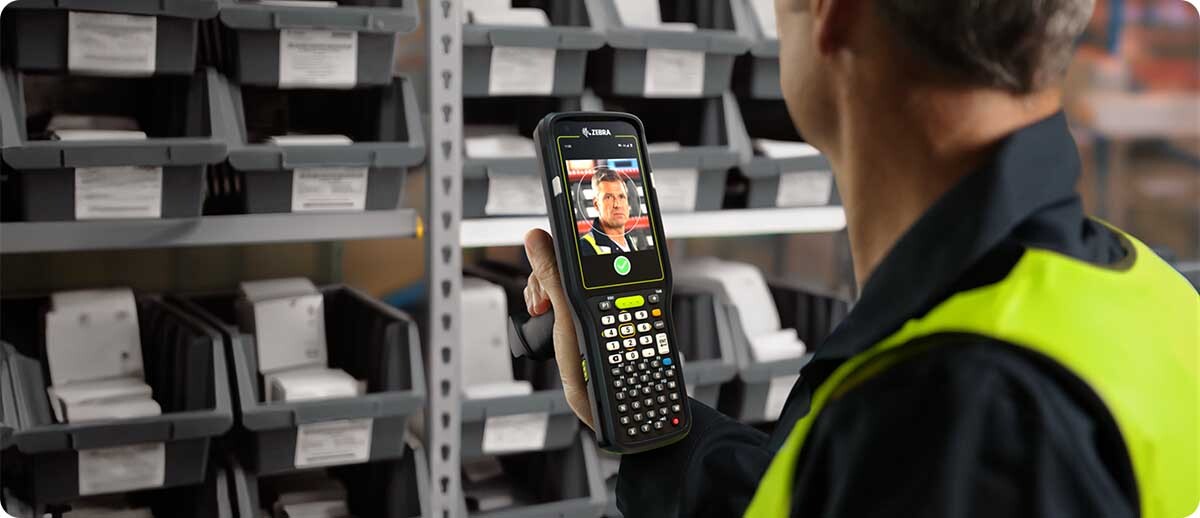
By ZPS Store | Mobile Computers | Zebra MC3400 and MC3450
This post covers what the MC3400 and MC3450 actually are, how they differ from each other, which scan engine and keypad options matter for which workflows, and what the MC3300 upgrade path looks like in practice.
What Are the Zebra MC3400 & MC3450?
What makes these different from other Zebra mobile computers?
The MC3400 and MC3450 sit in a specific spot in Zebra's mobile computer lineup: mid-range devices built specifically for workers who need a physical keypad. Most modern mobile computers have gone fully touchscreen, which works fine for glove-free environments with good screen visibility. The MC3400 and MC3450 are for operations that haven't made that jump, either because workers are gloved, because data entry happens in bright or dim conditions where a touchscreen becomes unreliable, or simply because the workflow involves repetitive numeric entry that's faster on physical keys than on glass.
The underlying hardware is modern: Qualcomm 4490 octa-core processor, up to 6 GB RAM and 128 GB storage, Android with GMS, Wi-Fi 6E (tri-band), Bluetooth 5.3, NFC, and a 7,000 mAh hot-swappable battery. The physical package is purposefully familiar to anyone who has used an MC3300, which makes fleet transitions easier from a training standpoint.
Who is actually buying these?
Primarily warehouse and distribution center operations doing receiving, put-away, order picking, inventory counts, and shipping verification. Manufacturing environments tracking work-in-process, running quality checks, or managing line replenishment. Retail backrooms handling store receiving, price updates, and reverse logistics. The common thread is workers covering ground on a shift, scanning barcodes, entering data, and doing it with gloves on or in conditions where a phone-style device creates friction.

MC3400 vs. MC3450: What Is the Actual Difference?
Is the MC3450 just an MC3400 with a SIM card?
Essentially, yes. The MC3450 is the cellular variant of the same platform. It adds 5G LTE data connectivity and integrated GNSS, which means it can operate outside a Wi-Fi network and report its location. The MC3400 is Wi-Fi only and does not include cellular or GPS.
For most warehouse and DC operations, the MC3400 is the right call. Your facility has Wi-Fi coverage, workers stay inside, and there's no need to pay for a cellular data plan on every device. The MC3450 earns its cost premium in field service, outdoor yard operations, or any workflow that takes workers outside the Wi-Fi footprint and requires connectivity or location tracking while they're out there.
| MC3400 | MC3450 | |
|---|---|---|
| Wi-Fi | Wi-Fi 6E (tri-band) | Wi-Fi 6E (tri-band) |
| Cellular | None | 5G LTE (data only) |
| GNSS / GPS | No | Yes |
| Best for | Indoor warehouse / DC / manufacturing | Field service / outdoor / yard operations |
| Starting price | From $2,596.73 | From $4,097.66 |
Scan Engines: The Configuration That Changes the Most
Which scan engine should we spec for our operation?
The scan engine is the configuration decision that has the biggest real-world impact on how the device performs for your workers. The MC3400 and MC3450 support four main engine options:
SE4710 — Standard Range
The baseline 2D imager. Covers most standard warehouse scanning tasks at typical arm's-length to a few feet. Good fit for receiving, put-away, and counter-height barcode scanning where the label is close and well-presented.
SE4770 — Standard Range with Wider Angle
Similar range to the SE4710 but with a wider scan angle. Useful when workers are scanning items at varying orientations without repositioning the device. A common choice for general-purpose distribution center work.
SE55 — Advanced Range (up to 40+ feet)
For operations where workers need to scan barcodes above head height or on mid-rack shelving without repositioning. Handles labels from close range up to 40+ feet. A strong fit for pick operations in high-bay warehouses where the label is on an upper shelf or on a pallet at distance.
SE58 — Extended Range (up to 100 feet)
The longest-range option in the lineup. Designed for scanning barcodes on containers, overhead racks, or large storage areas where a worker cannot get close to the label. At 100 feet, this is the right choice for yard operations, container scanning, or very high-bay racking. It also handles close-range scanning, making it versatile across different scan distances in the same workflow.
If you're not sure which engine fits your environment, the safe mid-range choice for most DC and warehouse operations is the SE55. It covers standard workstation scanning and handles the high-shelf reads that frustrate workers using a standard-range engine. The SE58 is the right call when your labels are on containers or overhead storage beyond 40 feet.

Keypad Options
Which keypad configuration is right for our workflow?
The MC3400 and MC3450 come in three keypad layouts. The right one depends almost entirely on what workers are actually typing during a shift:
- 29-key numeric: The most compact layout. Numbers, basic functions, and navigation. Right for workflows that are almost entirely scan-driven with minimal manual data entry. If workers are scanning barcodes and occasionally entering a quantity, this is sufficient.
- 38-key function-numeric: The most common choice. Adds dedicated function keys alongside the numeric layout. Good for warehouse and DC workflows where workers use application function keys in addition to numeric entry. Covers the majority of WMS-driven picking and receiving workflows.
- 47-key alphanumeric: Full alpha coverage alongside numeric keys. For workflows requiring manual text entry, such as notes, lot numbers with alpha characters, or manual lookups by name. Less common in pure scan-driven DC environments but the right call when workers regularly type alphanumeric strings.
Battery and Durability
How does the MC3400 handle a full shift?
The standard 7,000 mAh battery is rated to get through a full shift for most use cases. The hot-swap design means the battery can be changed without powering down the device and without losing the active session, which keeps productivity intact during the swap. For two-shift operations, stocking spare batteries and rotating them at shift change is the cleanest approach rather than waiting for the device to prompt a charge mid-shift.
On the durability side, the MC3400 and MC3450 carry dual IP65/IP67 sealing with the battery installed. That covers dust intrusion and water immersion, which handles the cleaning cycles and accidental spills that are routine in warehouse environments. The devices are also tested for drop resistance and repeated tumbles, which matters in operations where handheld devices regularly get set down hard or dropped from waist height.

Upgrading from the MC3300: What to Know
We have an MC3300 fleet. Is the MC3400 a straightforward upgrade?
Largely yes, with one important caveat on accessories. The MC3400 and MC3450 are designed as successors to the MC3300 series and share the same form factor family, so the physical ergonomics and workflow fit are consistent. Workers who have used an MC3300 will find the MC3400 immediately familiar in hand.
Accessory compatibility is not a blanket carry-over. Some MC33 accessories are compatible with the MC3400, but compatibility needs to be verified at the individual SKU level before assuming your existing cradles, holsters, and charging infrastructure will work with the new devices. Confirm specific accessory compatibility before ordering a fleet migration so you're not dealing with incompatible hardware on day one.
On the software side, the MC3400 runs Android with GMS and supports Zebra DNA management tools, which means it integrates with the same MDM and staging workflows your MC3300 fleet used if you're running SOTI MobiControl, 42Gears SureMDM, or Zebra's own StageNow for configuration management.
Quick Questions
Does the MC3400 support Android updates long-term?
Yes. The MC3400 and MC3450 are built on Zebra's Lifeguard for Android platform, which provides OS updates, security patches, and extended software support well beyond what a standard Android device would receive. This is a meaningful consideration for fleet purchases where devices are expected to stay in service for five or more years. Zebra publishes its Android version support timelines, so you can confirm your expected support window before committing to a fleet.
Can the MC3400 run our existing WMS application?
If your WMS runs on Android, almost certainly yes. The MC3400 runs Android with GMS, which covers the vast majority of enterprise WMS applications currently in deployment. If your WMS is browser-based or runs as an Android app, it should work on the MC3400 without modification. If your application was built for Windows Mobile or CE, you will need to address the application layer separately since the MC3400 does not run Windows-based operating systems. Contact us if you're evaluating a migration from a Windows-based device platform and need to discuss your application options.
What is the difference between the gun and straight-shooter form factors?
The gun form factor (also called pistol grip) includes a trigger handle below the device body. Workers hold it like a scanner, with the trigger initiating scans. It's the ergonomic choice for operations involving high scan volume throughout a shift, particularly when scans are directed upward or at varying angles. The straight-shooter (brick) form factor is a rectangular device without the grip extension, more compact and easier to pocket or holster. It works well for workers who alternate between scanning and data entry or who carry the device in a holster rather than hand-held continuously. Both form factors are available across the MC3400 and MC3450 lineup.
If you want to talk through which MC3400 or MC3450 configuration fits your operation before ordering, we're easy to reach. The scan engine and keypad decisions in particular are worth a five-minute conversation if your team hasn't landed on the right spec yet. Browse the full MC3400 and MC3450 lineup at ZPS Store or reach out and we'll help you configure the right device for your fleet.