
Zebra TC73 vs. TC78: Same Device, One Big Difference. Which One Does Your Operation Need?
Posted by The ZPS Store on Jul 1st 2026

By The ZPS Store | Mobile Computers | TC73 vs. TC78 Buyer's Guide
If you've already narrowed it down to the TC7 series and you're just trying to figure out which one to order, you're in the right place. This isn't a deep dive into specs you can already read on the product page. It's a practical look at when the TC73 is the right answer, when the TC78 is the right answer, and what you'd actually be paying the premium for.
What They Have in Common
Before getting into the difference, it's worth being clear about how much these two devices share, because it's a lot.
Both run on the Qualcomm 6490 octa-core processor with 8GB of RAM and 128GB of flash storage. Both have the same 6-inch Full HD display that works with wet hands, gloves, or a stylus. Both are rated for multiple 10-foot drops to concrete and 2,000 consecutive tumbles, which puts them in the ultra-rugged category alongside heavy industrial environments rather than just warehouses. Both are IP65 and IP68 sealed. Both offer the choice of the SE4770 standard range scan engine or the SE55 advanced range engine that reads barcodes from in-hand all the way out to 40 feet. Both support Bluetooth 5.2 and four battery configurations including wireless charging and a BLE-enabled battery for device tracking.
In other words, if you're choosing between these two purely on ruggedness, performance, or scanning capability, you're not actually choosing between them. They're identical on all of that.

The One Actual Difference
What connectivity does the TC73 have versus the TC78?
The TC73 connects via Wi-Fi 6E. That's it. Fast, modern Wi-Fi with better performance in dense environments and support for the 6 GHz band, but Wi-Fi only. If a TC73 user walks out of a building, off a dock, into a parking lot, or onto a job site without Wi-Fi coverage, they lose their connection to your WMS and any cloud-based application they're running.
The TC78 has everything the TC73 has, plus 5G cellular and support for CBRS private LTE networks. A worker with a TC78 stays connected via the carrier's cellular network when Wi-Fi isn't available, the same way a smartphone stays connected when you walk outside. For operations where workers stay inside a facility with solid Wi-Fi coverage the entire time, this matters very little. For operations where workers go outside, move between buildings, drive routes, or work at sites without Wi-Fi infrastructure, it's a significant operational difference.
What is CBRS and does it matter for my operation?
CBRS stands for Citizens Broadband Radio Service, a shared spectrum band in the US that companies can use to deploy their own private LTE networks without relying on a public carrier. Think of it as a private cellular network that an operation owns and controls, similar to Wi-Fi infrastructure but with cellular-like coverage and reliability over larger areas. It's increasingly used by large distribution centers, ports, campuses, and industrial facilities where the scale or physical environment makes traditional Wi-Fi tricky to deploy effectively.
If your operation doesn't have a CBRS deployment and isn't planning one, the CBRS support in the TC78 doesn't affect your day-to-day use. It's worth knowing about because it's an option, but it's not a reason on its own to choose the TC78 over the TC73.
Which One Is Right for Your Operation?
When should you choose the TC73?
Choose the TC73 when your workers operate inside a facility with consistent Wi-Fi coverage for their entire shift. That covers most warehouse, distribution center, manufacturing floor, retail back-office, and healthcare environments where the building has a properly designed wireless network. The TC73 delivers the full ultra-rugged TC7 series platform at a lower price than the TC78. If cellular connectivity isn't something your workers need, paying for it doesn't make sense.
It's also the right choice when IT manages a corporate-only Wi-Fi policy and cellular access on a work device creates security or MDM complications. Some organizations specifically don't want managed devices on cellular networks, and the TC73 removes that question entirely.
When should you choose the TC78?
Choose the TC78 when your workers spend any meaningful part of their shift outside of reliable Wi-Fi coverage. That includes outdoor receiving docks, yard management, lot inventory, loading areas, construction sites, campus environments, and any multi-site operation where workers travel between locations throughout the day. A TC73 in those environments has to work around gaps in coverage, which means dropped WMS sessions, delayed scan data, and workarounds that slow everything down. The TC78 just stays connected.
The TC78 also makes sense when your operation is growing or evolving and you're not entirely sure yet which parts of a new workflow will happen outside. It's much easier to deploy TC78s with cellular capability you don't fully use yet than to deploy TC73s and discover six months later that a new workflow requires connectivity you don't have.
What about mixed fleets, some TC73 and some TC78?
This is actually pretty common and it works fine. The TC73 and TC78 share the same accessories, the same cradles, the same batteries, the same scan engines, and the same software platform. Staging them with StageNow, managing them in your MDM, and maintaining spare accessories for both is no more complicated than managing a single model because the two devices are otherwise identical. Many operations deploy TC73s for purely indoor roles and TC78s for workers who regularly go outside, and treat them as the same device for everything except the carrier data plan on the TC78s.
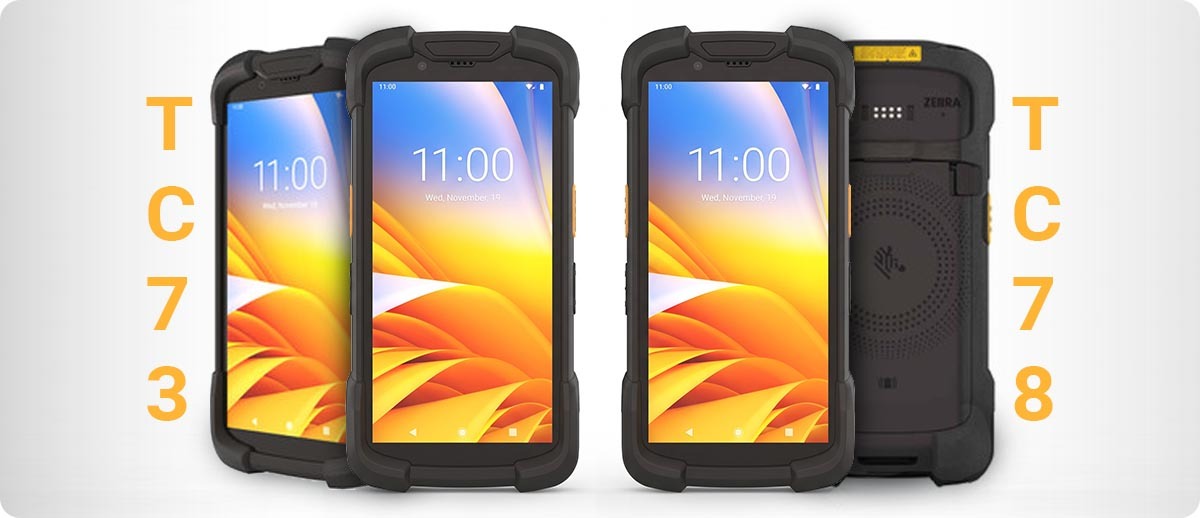
TC73 vs. TC78 at a Glance
| Feature | TC73 | TC78 |
|---|---|---|
| Wi-Fi | Wi-Fi 6E | Wi-Fi 6E |
| Cellular | Not included | 5G + CBRS private LTE |
| Processor | Qualcomm 6490, 8GB/128GB | Qualcomm 6490, 8GB/128GB |
| Display | 6-inch FHD, glove and wet touch | 6-inch FHD, glove and wet touch |
| Drop rating | 10 ft to concrete | 10 ft to concrete |
| Scan engines | SE4770 or SE55 (up to 40 ft) | SE4770 or SE55 (up to 40 ft) |
| Sealing | IP65 / IP68 | IP65 / IP68 |
| Best for | Indoor, facility-based workers with Wi-Fi | Outdoor, field, and multi-site workers |
Shop TC73 and TC78 at The ZPS Store
Zebra TC73 Mobile Computer
Wi-Fi 6E | 10 ft drop | IP65/IP68 | SE4770 or SE55 scan engine | 8GB/128GB
TC7301-0T1J6B1000-NA: SE4770 standard range, 4680 mAh battery, NA
TC7301-0T1K6B1000-FT: SE55 advanced range, FIPS, 4680 mAh battery, NA
TC7301-0T1K6E200B-NA: SE55 advanced range, certified parcel dim, 4680 mAh, NA
Shop Zebra TC73 →Zebra TC78 Mobile Computer
Wi-Fi 6E + 5G cellular + CBRS | 10 ft drop | IP65/IP68 | SE4770 or SE55 | 8GB/128GB
TC78A1-3T1K6E2E1A-NA: SE55 advanced range, wireless charge, extended 6600 mAh battery, non-certified parcel dim, NA
Shop Zebra TC78 →
Questions People Ask About These Two
I work mostly indoors but sometimes go outside. Should I still get the TC78?
Depends how often and how critical that outdoor time is. If going outside means walking to a parking lot for two minutes once a day, the TC73 with its slightly shorter Wi-Fi range gap is probably fine. If going outside means scanning vehicles, checking yard inventory, or managing dock activity where staying connected during the whole task matters, the TC78 is worth the premium. The question to ask is whether a dropped connection during that outdoor time would actually cause a workflow problem, or just be a minor inconvenience.
Do I need a data plan for the TC78?
To use the 5G cellular connectivity, yes, you need a data plan from a carrier, the same as you would for any cellular device. The TC78 can also operate in Wi-Fi-only mode without any carrier plan, in which case it behaves exactly like a TC73 as far as connectivity goes. Some operations buy TC78s for the flexibility and activate cellular plans only for the specific devices or roles that need them rather than fleet-wide.
Are TC73 and TC78 accessories interchangeable?
Yes. The TC73 and TC78 share the same cradles, batteries, cases, scan engine configurations, and accessory ecosystem. If you end up running a mixed fleet of both, you only need to stock one set of spare accessories and one set of charging infrastructure.
What is the SE55 scan engine and do I need it?
The SE55 is Zebra's advanced range scan engine, available on both the TC73 and TC78. It reads barcodes from in-hand contact out to about 40 feet, which covers high-rack warehouse scanning, lot and yard scenarios, and any workflow where workers scan items that are physically out of normal reach. The SE4770 is the standard range option and covers typical close-to-medium range scanning. If your team scans from high racks or at extended distances as a regular part of their workflow, the SE55 is worth it. If they scan items that are always within a few feet of them, the SE4770 is sufficient and the configurations with it are typically a bit less expensive.
If you've got a specific workflow in mind and want to make sure you're ordering the right configuration before you commit, fill out the form below and we'll help you work through it.